
Printing Types
Overview
Printing Types separates the estimating setup to use specific Parts, Colours, Press Types, and Substrates. The following setups must be linked to a Printing Type:
- Parts
- Ink Groups
- Presses
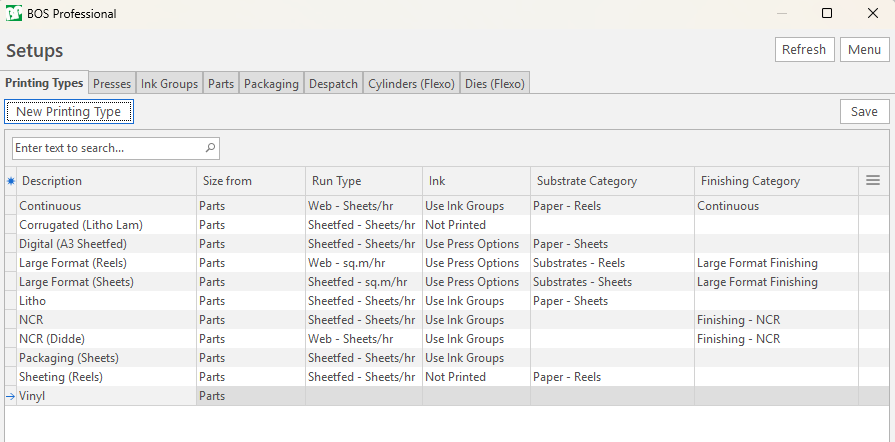
Setups Screen
Printing Types is a tab of the Setups screen, with the other standard estimating setups.
Buttons Explained
| Button | Description |
|---|---|
| Refresh | Reloads the open tab. |
| Menu | The grid layout options:
|
Printing Types Tab: Buttons Explained
| Button | Description |
|---|---|
| New Printing Type | Adds a Printing Type. |
| Save | Saves your changes. |
Fields Explained
Info
Fields marked in green (✎) can be edited.
| Field | Description |
|---|---|
| Size from |
|
| Run Type |
|
| Ink |
If the Run Type is Sheetfed - sq.m/hr or Web - sq.m/hr, the Ink is always set to Use Press Options. |
| Substrate Category |
|
| Finishing Category |
|
| Branch |
|
Tags that can be used in Printing Description
Imposition
- <SECTIONDEPTH> – Part Depth.
- <SECTIONWIDTH> – Part Width.
- <QTYDOWN> – Qty down on Printing Imposition.
- <QTYACROSS> – Qty Across on Printing Imposition.
- <QTYUP> – Qty Up on Printing Imposition.
Printing
- <COLOURSFRONT> – List of Colours printed front.
- <COLOURSBACK> – List of Colours printed back.
- <PLATEQTY> – Plate Qty.
- <SPEED> – Run speed – unit depends on Printing Type.
- <BLEED> – Bleed on the Part.
- <INSTRUCTION> or <PRINTNOTE> – The Note field on the Printing page of the Print Wizard.
Worksheets
- <WORKDEPTH> – Work Depth.
- <WORKWIDTH> – Work Width.
- <WORKSHEETS> – No. of Worksheets (selected from the Parts table).
- <RUNSHEETS> – No. of Runsheets.
- <NETTSHEETS> – Net Worksheet Qty (without MR or Run Overs) – unit depends on Printing Type.
- <SETUPSHEETS> – Worksheets allowed for Setup – unit depends on Printing Type.
- <RUNOVERSHEETS> – Worksheets allowed for run-overs – unit depends on Printing Type.
- <TOTALWORKSHEETS> – Total number of Worksheets – unit depends on Printing Type. (Substrate Total Qty * Qty/Out).
Paper
- <PAPERNAME> – Substrate Description.
- <SHEETDEPTH> – Sheet Depth (Stock Sheet).
- <SHEETWIDTH> – Sheet Width (Stock Sheet).
- <QTYOUT> – Qty Worksheets cut out of Stock sheets.
- <PAPERNETTQTY> – Nett Substrate Quantity excluding Setup and Run Overs.
- <PAPERMRQTY> – Substrate quantity allowed for Setup.
- <PAPERRUNOVERQTY> – Substrate quantity allowed for Run overs.
- <PAPERQTY> – The Total Substrate Qty – unit depends on the Printing Type.
- <PAPERRUNQTY> – Substrate quantity for the run including Nett Qty and Run overs.