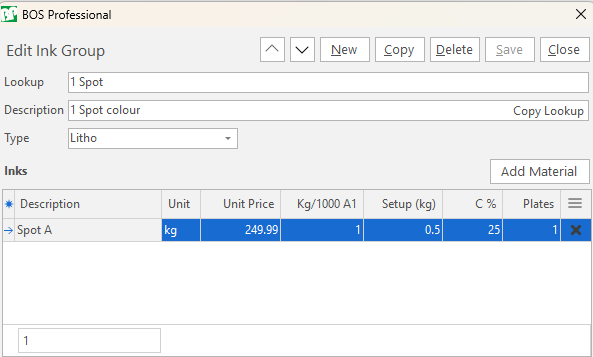
Ink Groups
Overview
- Inks are added to a Part in Groups.
- Check Do not add Plate/s if you are adding inks to a Part that uses the same plates as a previous part.
Setups Screen
Ink Groups is a tab of the Setups screen, with the other standard estimating setups.
Buttons Explained
| Button | Description |
|---|---|
| Refresh | Reloads the open tab. |
| Menu | The grid layout options:
|
Ink Groups Tab: Buttons Explained
| Button | Description |
|---|---|
| New Ink Group | Adds an Ink Group. |
Setting Up
Each Group is linked to a Printing Type in the Type field. The Type field only lists the Printing Types with Ink set to Use Ink Groups.
Each Group contains a list of Inks with the following specifications:
Info
Fields marked in green (✎) can be edited.
| Field | Description |
|---|---|
| Kg/1000 A1 | How much ink is required to cover 1000 A1 sheets (500 sq.m) with a 100% coverage. |
| Setup (kg) | Allows for washup waste and a minimum cost for special inks that are not kept in stock. |
| C % | The default coverage percent which lets you set up multiple groups for light and heavy coverage. |
| Plates | You may for instance set up a CMYK group with two black plates that let you run 2x variants of the job. |
Warnings
Unit Price: If the Unit Cost of the linked material is zero, the field is highlighted in red to warn you that the cost of the linked material must be updated.