
Use Customer Budgets to Spot Sales Trends Before They Become Problems
Why customer budgets matter
If you have regular customers, are you on top of their buying habits? Would you know if they quietly stopped buying from you? Customer budgets help you move from reactive sales management to proactive relationship management by giving you a target to compare against actual sales performance.
A customer budget gives your team a practical way to understand expected customer value, monitor performance and identify changes in buying patterns. When budgets are aligned with customer expectations and historical activity, they help you focus resources where they matter most. They also help you strengthen customer relationships, improve retention and uncover opportunities for repeat sales or intervention when activity drops.
Create customer budgets in BOS Professional
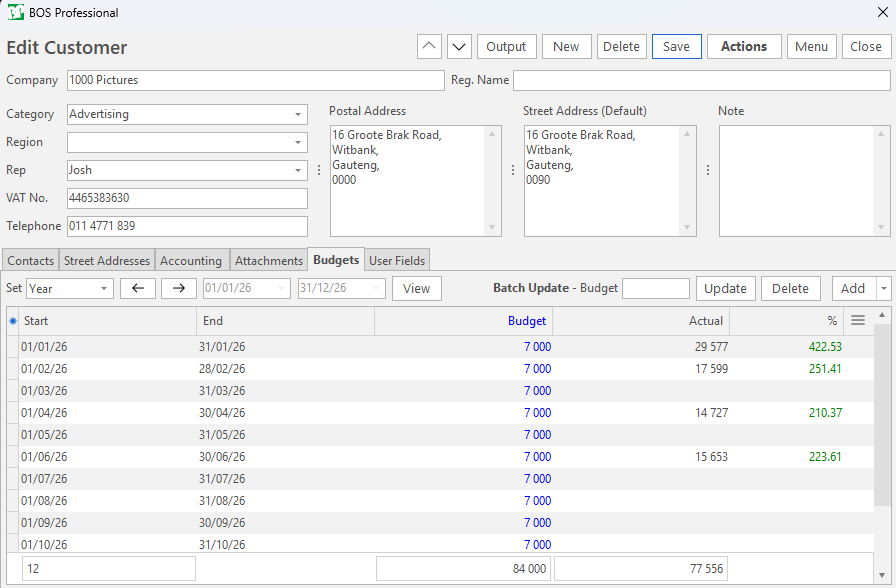
BOS Professional lets you create budgets directly from the customer interface. Open a customer record and click the Budgets tab. Next to Set, choose the period you want to work with. The date defaults to the current year, but you can refine it as needed.
Add monthly budgets
To create monthly budgets, click the arrow on the Add button and click Add monthly budgets for the selected period. BOS Professional populates the records with actual sales for the selected period and provides a budget column where you can enter the planned value.
You can enter a budget directly into the Budget column. This method works well if customer sales are cyclical. Alternatively, you can update multiple records at once. Select the records you want to update, type the monthly budget amount next to Batch Update – Budget, click Update (button) and confirm the change. For example, if the customer’s total sales for last year was R58 000 and you increased your prices by 3% you calculate a monthly amount as follows: (58 000 x 1.03) / 12 and round the final total to the nearest 10 to get R4 980.
Use the arrow keys on the top to move to the next customer and continue adding budgets until all your active customers are allocated budgets.
Add annual budgets
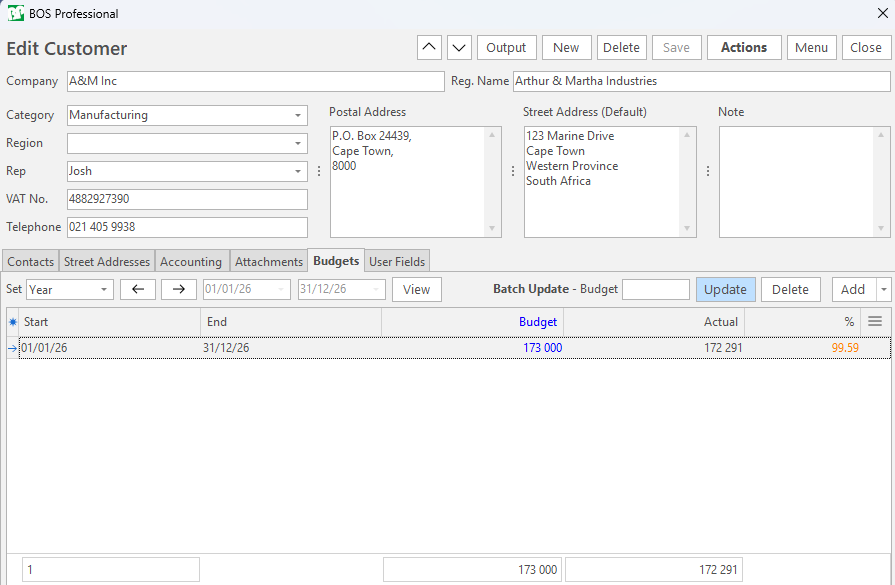
If you prefer to set an annual budget, click the Add button instead of the arrow. Select a start date and end date, enter the budget and click Save (button). BOS Professional then exposes the actual sales for the period you entered, so you can compare actual performance against the budget. Thereafter, you can edit the budget as needed.
As you create budgets, the % column starts showing how much of the budget is already reached. The % column gives you a quick way to see whether a customer is tracking as expected, underperforming or already exceeding their budget.
View Budgets vs Actuals
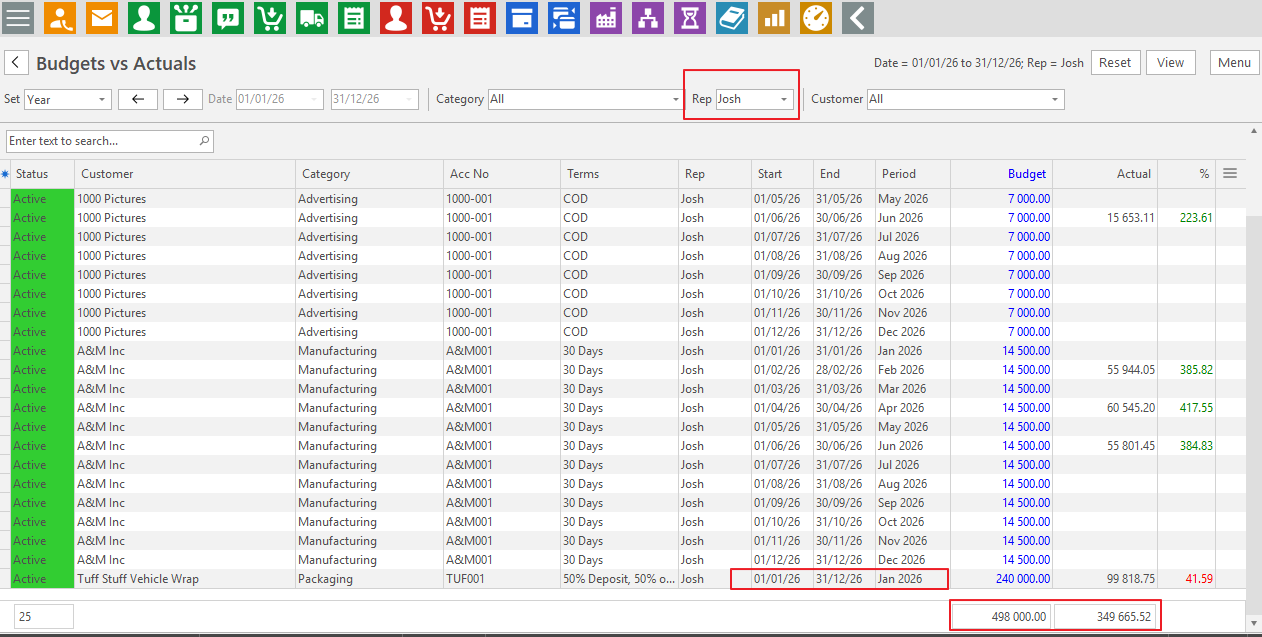
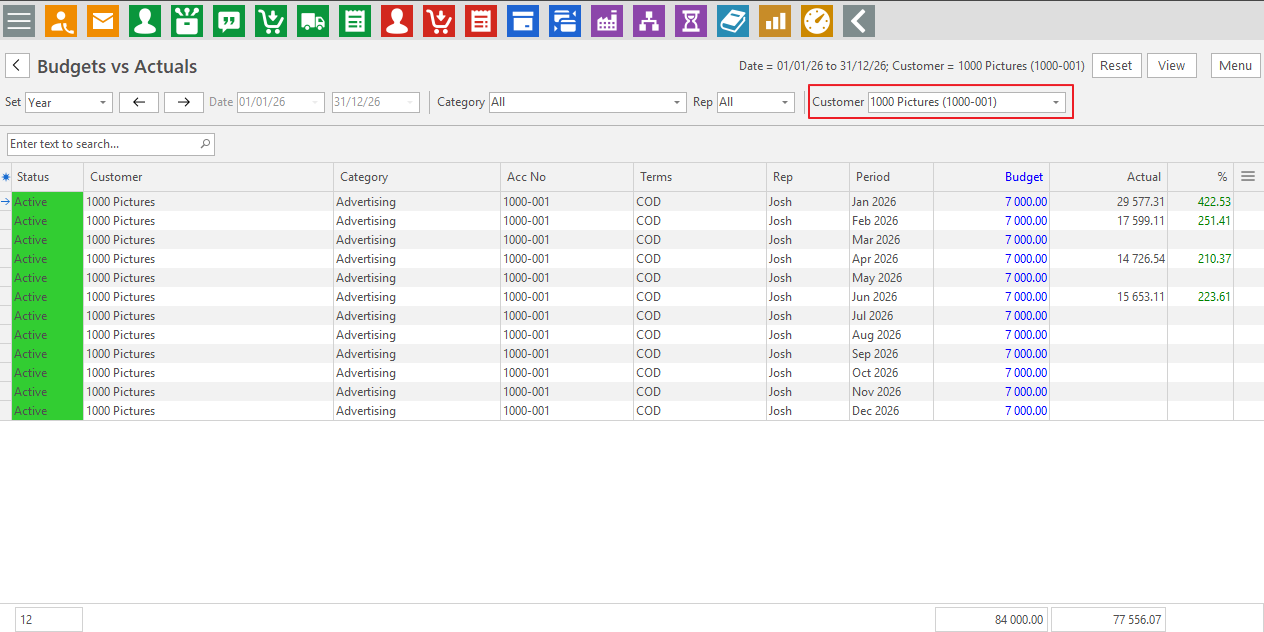
To see all customer budgets, open your Service Manager for example, Main Menu > Office > Service Manager. Click Menu (button) > Budgets vs Actuals, choose the filters you want and click View (button).
Individual monthly entries may not always give the full picture, especially where some months have no sales. For best results, view the report per customer or per representative. The totals at the bottom of the report help you see whether a customer is still active or falling behind, or whether a representative’s customers are not meeting expectations.
You can also use the Field Chooser (*) and display the Start and End dates to ensure you are comparing the same budget periods. If some customers have annual budgets and others have monthly budgets, use these dates to identify and standardise the entries where needed.
Edit budgets when circumstances change
To edit a customer from the Budgets vs Actuals report, right-click an entry and select Open Customer. From the customer record, you can update budgets as needed. To change an annual budget to monthly, delete the annual entry: click the last column to display the x, then click the x. Then add monthly budgets as explained above.
Turn customer budgets into action
Start using customer budgets in BOS Professional today and give your team a clearer, more proactive way to manage customer performance. Set budgets, compare them to actual sales and review the results regularly. This way, you can spot gaps sooner, follow up with the right customers at the right time and turn missed sales signals into meaningful conversations.
Make customer budgeting part of your routine so you can protect existing revenue, strengthen customer relationships and grow with greater confidence.
Not seeing these features? Contact support for assistance.