
Cashups
Overview
- The Point of Sale - Cashups module is designed to track and manage cash received.
- It operates independently from the system's accounting functions.
- It is a continuous system and uses the previous day's closing balance as the opening balance.
- The system calculates the expected cash total based on transactions recorded in the Point of Sale (PoS) system for the specified period.
- You count the cash and input the totals per denomination.
- The system compares the actual against the calculated totals and identifies any variances.
List View
Info
The list view displays all Cash-up entries in the selected period.
Buttons Explained
| Button | Description |
|---|---|
| Reset | Resets the Data Filters to default. |
| View | Displays the Cashups according to the selected Data Filters. |
| New | Creates a Cashup. |
| Output |
|
| Menu |
|
Data Filters Explained
| Filter | Description |
|---|---|
| Date | Sets a specific time frame such as Today, This month, This year, Fin year. |
| ← → | Adjusts the date in the direction of the arrow. |
| From | Allows a custom start date to be entered. |
| To | Allows a custom end date to be entered. |
Fields Explained
| Field | Description |
|---|---|
| Field Chooser (*) | Lets you add or remove columns. |
| Status | Indicates the status of the entry. |
| No. | The entry's number. |
| From | Starting date of the period covered by the entry. |
| To | Ending date of the period covered by the entry. |
| Last Float | Opening balance of cash. |
| Counted | Cash counted during the period. |
| Drawn | Cash withdrawn from the cash register during the period. |
| Next Float | Closing balance of cash. |
| User | User who created the entry. |
| Approval | User who set the status of the Cashup to Complete. |
| Menu (...) | A submenu that allows you to:
|
| Created | Date when the entry was created. |
| Created by | User who created the entry. |
| Updated | Date when the entry was last edited. |
| Updated by | User who performed the last edit. |
Edit View
Info
Edit View lets you create or update a single transaction.
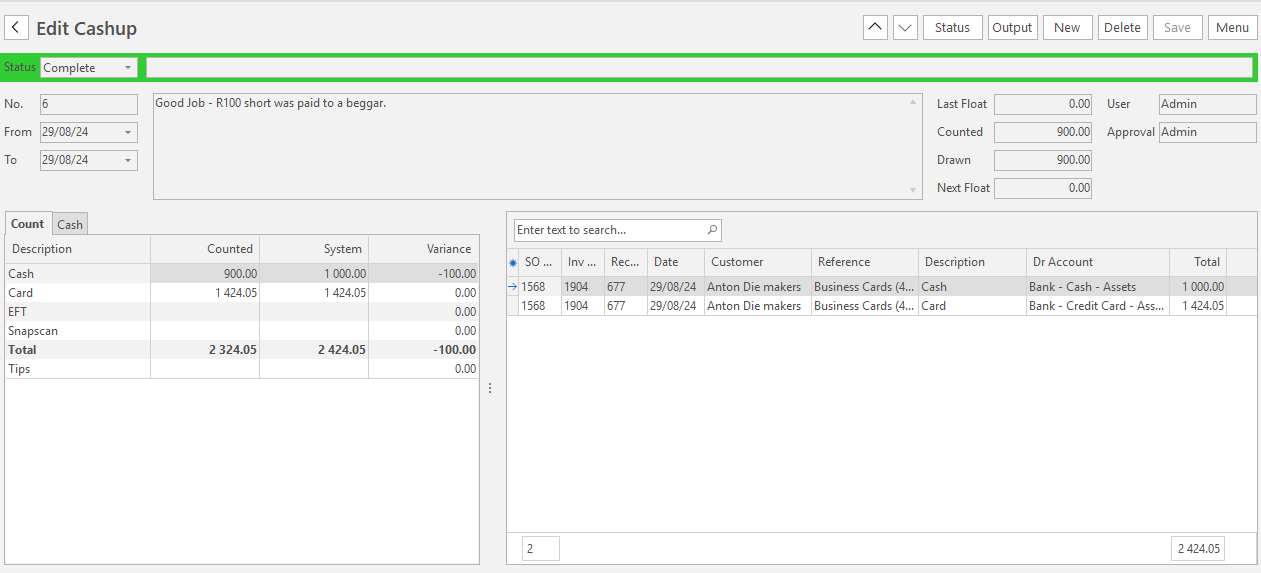
Button View
| Button | Description |
|---|---|
| ∧ ∨ | Lets you scroll through transactions. |
| Status | Updates the status of the Cashup. |
| Output | Outputs PDF Templates. Options include Print, Preview and Email. |
| New | Creates a new Cashup entry. |
| Delete | Deletes the Cashup entry. |
| Save | Saves any changes made (greyed out if there are no changes). |
| Menu |
|
Input Fields Explained
| Field | Description |
|---|---|
| Status Note | Enter any relevant comments or notes related to the status. |
| From | Starting date of the period. |
| To | Ending date of the period. |
| Note | Enter any relevant comments and notes. |
| Last Float | Amount of cash in the cash register at the Start Date of the period. |
| Drawn | Amount withdrawn from the cash register by the business during the period. |
Fields Explained
| Field | Description |
|---|---|
| Field Chooser (*) | Lets you add or remove columns. |
| SO No. | Sales Order number linked to the PoS order. |
| Inv No. | Customer Invoice number linked to the PoS order. |
| Receipt LID | Ledger ID of the Customer Receipt linked to the PoS order. |
| Date | Date the PoS order was paid. |
| Customer | Customer attached to the Sales Order. |
| Reference | Reference attached to the Sales Order. |
| Description | Description of Payment Method used. |
| Dr Account | Account debited. |
| Total | Total amount transacted. |
| Menu (...) | A submenu that allows you to:
|
| Trans ID (Receipt) | Customer ReceiptID linked to the PoS order. |
| User | User who created the PoS order. |
| SO Date | Date the PoS order was created. |
| Item | Lists accounting movements within a transaction numbered sequentially to represent each part of the transaction. |
Count Tab Explained
| Tab | Description |
|---|---|
| Description | The name of each payment method, the total and the tip. |
| Counted | A user-input field where the amount received during the period for each payment method is entered.
|
| System | The expected amount in each payment method, total and tips. |
| Variance | The difference between the counted and expected amounts. |
Cash Tab Explained
| Tab | Description |
|---|---|
| Denomination | Image and Name of the currency denomination. |
| Qty | User input field to enter the amount of the denomination present in the cash register. |
| Total | The cash value held in each denomination. |