Home Service Manager Service Manager - Customer Budgets Report
References
Service Manager - Customer Budgets Report
Overview#
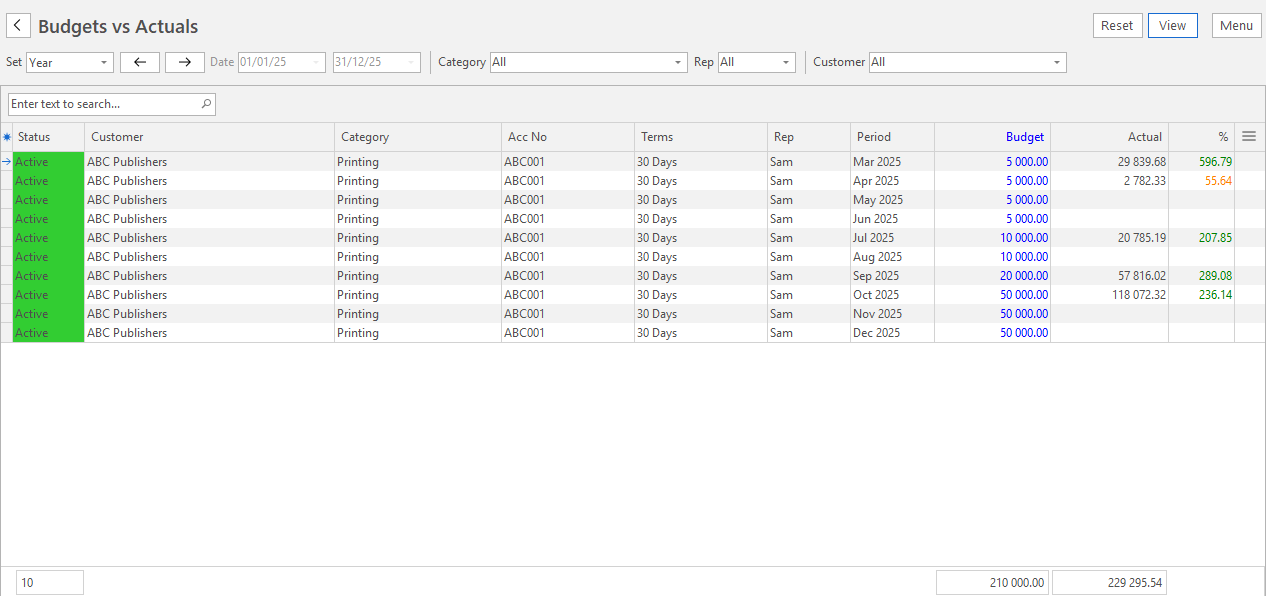
A target sales level can be created for each customer. This report compares those targets to the actual sales per month (Customer Invoices less Credit Notes) and is named the Budgets vs Actuals Report.
Navigation Main Menu > Office > Service Manager > Menu (button) > Reports > Budgets vs Actuals
Data Filters#
Filter Description Set Sets a specific period such as today, this month or this year. Date Allows custom dates to be entered. ← → Adjusts the date in the direction of the arrow. Category A dropdown list of Customer Categories to select one or all. Rep A dropdown list of reps to select one or all. Customer A dropdown list of customers to select one or all.
Fields#
Field Description Status Customer Status including Prospect, Occasional, Active, Suspended and Closed. Customer The Customer linked to the Budget. Acc No Customer Account Number that is input into the Accounting tab of the Customers module Edit view. Category The Category assigned to the customer. Rep The user assigned the role of representative linked to the customer. Terms Customer Credit Terms that are input into the Accounting tab of the Customers module Edit view. Period Date Period as input into the Budget tab of the Customers module Edit view. Start Budget Start Date as input into the Budget tab of the Customers module Edit view. End Budget End Date as input into the Budget tab of the Customers module Edit view. Budget Budgeted amount as input into the Budget tab of the Customers module Edit view. Actual Customer Invoice less Customer Credit Notes linked to the customer. % Percentage Value of Actuals vs Budget.
Learn More