
PoS - Cashups Tutorial
Overview
- The Point of Sale (PoS) - Cashups module is designed to track and manage cash received.
- It operates independently from the system's accounting functions.
- It is a continuous system and uses the previous day's closing balance as the opening balance.
- The system calculates the expected cash total based on transactions recorded in the PoS system for the specified period.
- You count the cash and input the totals per denomination.
- The system compares the actual against the calculated totals and identifies any variances.
💡These tutorials explain how to cash up PoS.
How to Create a Cash-up Entry
- Navigate to Main Menu > Accounting > Point of Sale - Cashups.
- Click New (button).
- Complete the header information as follows:
- Select the From and To dates.
- Enter a Note in the provided block (optional).
- Enter the Last Float value, if necessary.
- Note: The Cashup automatically draws the Last Float from the previous entry's Next Float value.
- Enter a Drawn value if any cash was taken out of the register by the business.
- Note: Any tips received must be recorded in Drawn.
- Click Save (button) to register any PoS transactions created in the specified dates.
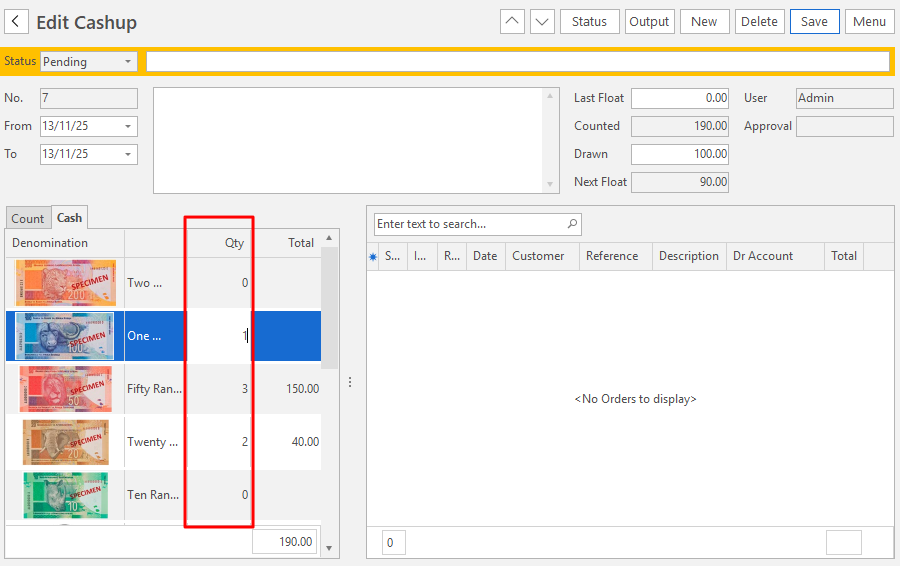
- Click Cash (tab) and enter the number of each currency that you have as shown below.
- Click Count (tab) and enter the amounts paid via non-cash payment methods in their respective input fields as shown below.
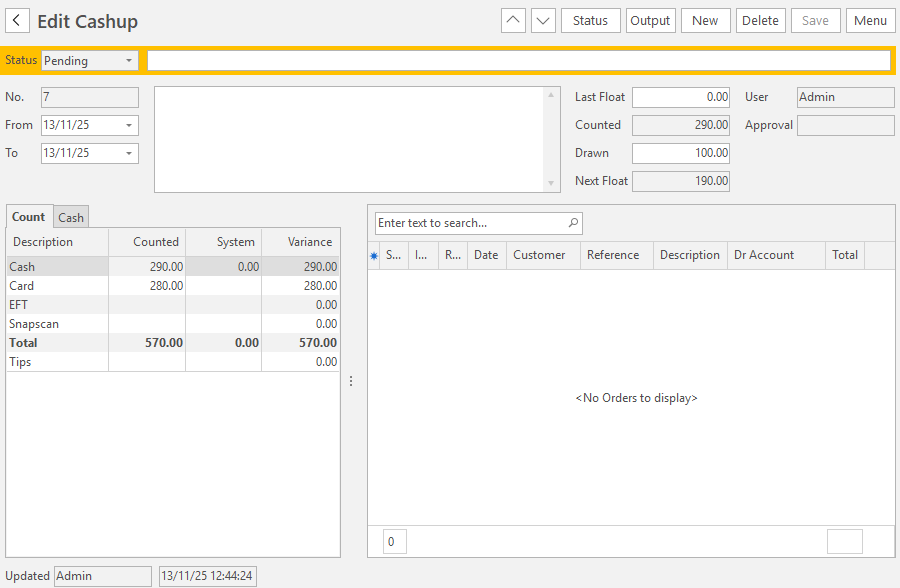
- Click Save (button) to fill in the cash amount on the Count tab.
- Click Status (button) > Complete.