
Service Manager Edit View
Overview
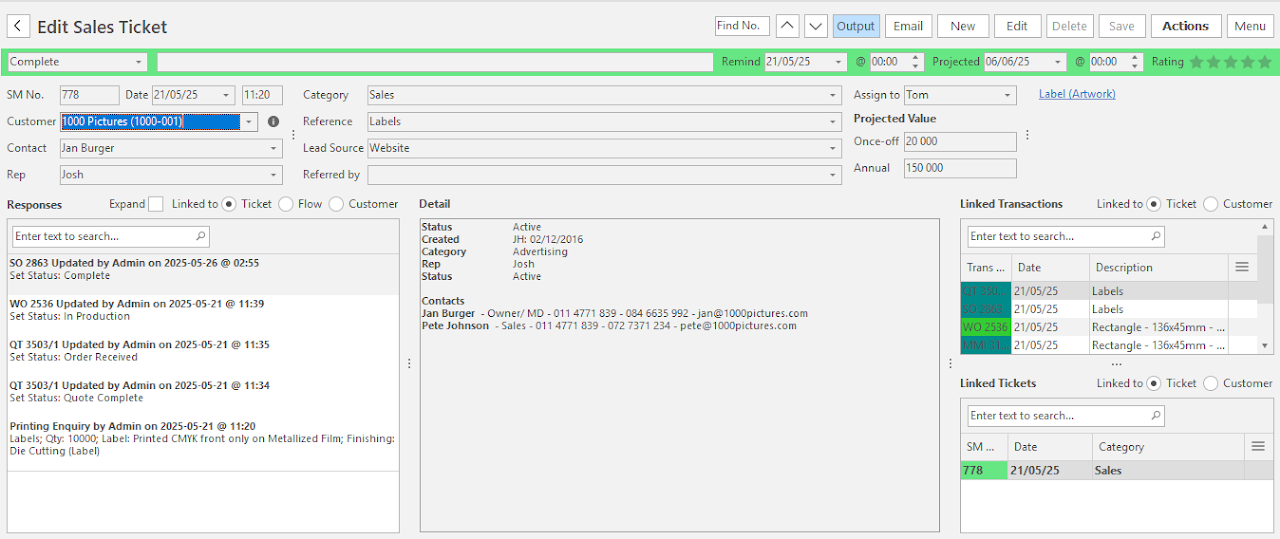
Use the Service Manager to manage issues or enquiries such as sales, account and production queries. It can be customised.
The Edit View is where service tickets are created and worked on.
Buttons Explained
| Button | Description |
|---|---|
| Arrows | Navigates between service tickets. |
| Output |
|
| |
| Edit | Lets you edit the ticket. |
| Delete | Deletes the service ticket. |
| Save | Saves any changes. |
| Actions |
|
| Menu |
|
Fields and Sections Explained
Status Bar
| Status | Description |
|---|---|
| Status |
|
| Status Note | Enter any note on the Status Bar. |
| Remind @ | A calendar and time chooser to select a date and time to be reminded about the ticket. |
| Projected | A calendar and time chooser to select a date and time by which the ticket should be closed. |
| Rating | A star rating field. You can request the customers to rate the service and click the stars accordingly. |
Header Information
| Field | Description |
|---|---|
| SM No. | The ticket number which is automatically assigned. |
| Date & Time | The date and time on which the ticket was created. |
| Customer | A dropdown list of customers for you to select one. |
| Contact | A dropdown list of customers' contacts for you to select one. |
| Rep | A dropdown list of reps for you to select one. |
| Category | A dropdown list of categories for you to select one. |
| Reference | Enter a reference. |
| Lead Source |
|
| Referred by | Provides a dropdown list of contacts or users to select one. |
| Assign to | The person the ticket is assigned to. |
| Projected Value |
|
Responses
- Expand (checkbox)
- Checked: Expands the responses.
- Unchecked: The responses are truncated.
- Linked to (radio buttons)
- Ticket: Displays only responses applicable to the current ticket.
- Flow: Displays responses applicable to the entire transaction flow.
- Customer: Displays all the interactions with the customer.
Lists all the ticket's responses.
Right-click a response to View/Edit Response or Delete Response.
Detail
- This section displays summary information, including the status, date created and the Customer's contact details.
- The information shown comes from a custom stored procedure and can be changed on request.
Linked Transactions
Info
The related transactions also link to the service ticket (Links (button)).
Service ticket responses can be viewed from linked Quotations by clicking Menu (button) > View SM Responses.
- Ticket (radio button): Displays all the transactions that are related to the current ticket.
- Customer (radio button): Displays all the transactions that involved the customer.
- The list is truncated to show only the last ten of each different transaction.
- The Menu (...) column has the following options:
- Unlink Transaction
- Open Transaction
Linked Tickets
- Ticket (radio button): Displays all the tickets that are related to the current ticket.
- Customer (radio button): Displays all the tickets that involved the customer.
- The Menu (...) column has the following options:
- Unlink SM Ticket
- Open linked SM Ticket
Linked NCRs
Lists the Non-Conformance Reports created from the ticket, with their NCR No., Reference and Date. Double-click an NCR to open it.
Attachments
Lists the ticket's attachments and links. Right-click an attachment to:
- Copy Link to Clipboard
- Edit it
- Delete it