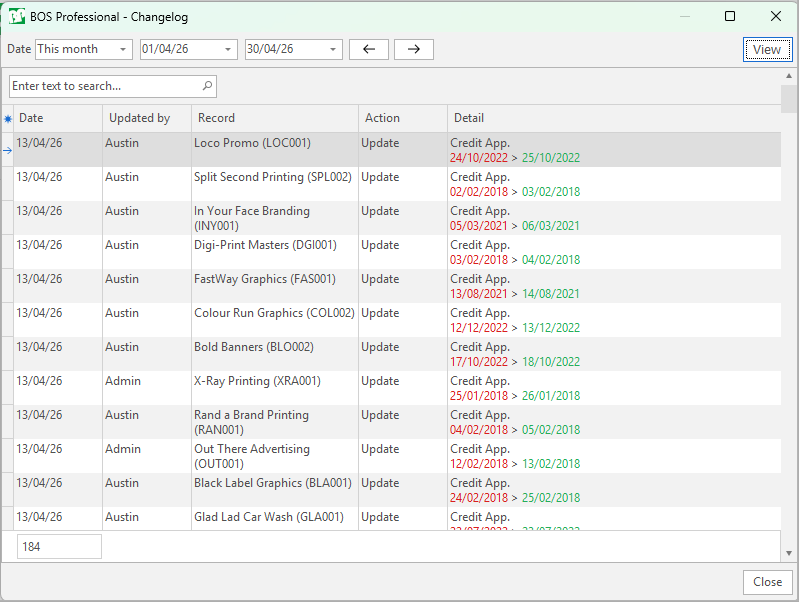
Change Logs
Overview
- Change Logs provide a list of changes made to transactions, records or prices.
- The change, date and user who made the change are recorded.
- Change logs introduced in the February 2026 upgrade only start logging changes from the date on which the upgrade is installed.
- If a change is made, and undone, it might not be recorded (e.g. changing a quantity from 1 500 to 1 600 and then changing it back to 1 500 because of a warning).
- Change Logs are available for:
- Customers
- Ledger
- Purchase Orders
- Sales Orders
- Service Manager
- Suppliers
- Work Orders
Filters Explained
| Filter | Description |
|---|---|
| Date | A selection of preset date options. |
| Date fields | Fields to enter custom dates. |
| ← → | Adjusts the dates in the direction of the arrow. |
Fields Explained
| Field | Description |
|---|---|
| ID | The system-generated number allocated to the entry. |
| Date | The date on which the record / transaction was updated. |
| @ | The time on which the record / transaction was updated. |
| Updated by | The user who updated the record. |
| Module | The name of the module that was updated. |
| Record | The entry that was changed. |
| Action | The action taken (e.g. created, updated, deleted). |
| Detail | Information about the changes. |
Example